LNN – Local Nested Notes
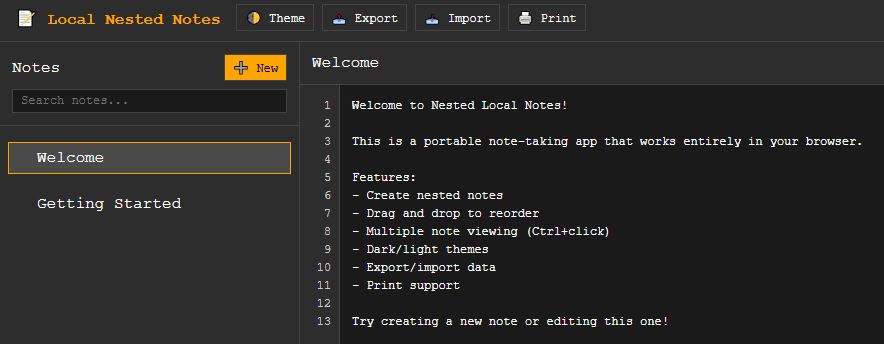
Local Nested Notes utility – keep notes local, and nest them! Simple, portable, private notes app. Cross-platform, dependency free. Works in any browser.
Instructions:
After clicking the link above, click ‘LNN.html,’ then choose ‘Download Raw File’ on the top right of the page.
Core Functionality
- Nested tree structure in the left sidebar with intuitive navigation
- Drag & drop reordering of notes
- Multi-note editing via Ctrl+click (notes appear tiled on the right)
- Context menus (right-click) for rename, duplicate, add child, delete
- All items are editable notes – no folder-only containers
Technical Features
- Single portable HTML file – no external dependencies
- Cross-platform compatibility – works on all modern browsers/devices
- Monospace font (Courier New/Monaco/Menlo) for consistent character width
- Line numbering with proper scroll synchronization
- Word wrap handled elegantly
- Print function with proper margins and print-optimized styling
Data Management
- JSON export/import for backup and transfer
- No automatic saving – data clears on refresh with warning
- Unsaved changes indicator (yellow dot in toolbar)
- Copy/paste works naturally with the textarea elements
UI/UX
- Dark/light theme toggle
- Minimalist black/white design with orange/yellow accents
- Responsive design that works on mobile devices
- Keyboard shortcuts (Ctrl+click for multi-select)
- Visual feedback for drag operations and selections
Getting Started
The app comes with two sample notes explaining how to use it. Simply:
- Click notes to select them
- Ctrl+click to select multiple notes for side-by-side editing
- Right-click for context menu options
- Drag notes to reorder them
- Use Export to save your work as JSON
- Use Import to restore from a saved file